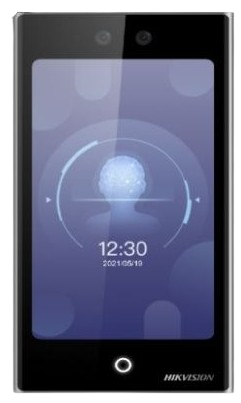
Step 1: Access Control Technology Choices
Access control systems regulate who can enter specific areas of a business premises, enhancing security, convenience, and operational efficiency. Several technologies are available, each suited to different needs based on security level, budget, user convenience, and scalability.
Types of Access Control Technologies
| Technology |
Description |
Pros |
Cons |
Applications |
| Keypad/PIN Code Systems |
Users enter a numeric code on a keypad to gain access. |
Affordable, easy to install, no physical credentials needed. |
Codes can be shared or guessed, less secure against sophisticated threats. |
Small offices, storage rooms, or low-risk areas. |
| Card/Key Fob Systems (RFID/Proximity) |
Users swipe or tap a card or fob using radio frequency identification (RFID) technology. |
Quick access, easy to revoke lost credentials, integrable with other systems. |
Cards can be lost, stolen, or cloned; requires readers at each door. |
Medium-sized businesses, offices, or warehouses. |
| Biometric Systems (Fingerprint, Facial Recognition, Iris Scan) |
Scans unique biological traits for authentication. |
High security (hard to fake), no credentials to carry, reduces fraud. |
Higher cost, privacy concerns, can fail in dirty or variable lighting conditions. |
High-security areas like data centers or financial institutions. |
| Mobile/Bluetooth/NFC Systems |
Uses smartphones via apps, Bluetooth, or near-field communication (NFC) for access. |
Convenient (uses existing devices), remote management, easy updates. |
Dependent on phone battery/network, potential cybersecurity risks. |
Modern offices, retail, or multi-site businesses. |
| Smart Locks (Standalone or Integrated) |
Electronic locks that can combine PIN, card, or mobile access, often wireless. |
Wireless installation reduces wiring costs, scalable. |
Battery-dependent, may require frequent maintenance. |
Small to medium businesses or retrofits. |
Popular Brands in South Africa with High Positive Sentiment
Based on reviews, supplier listings, and user feedback in South Africa, the following brands are commonly used and receive positive sentiment for reliability, local support, and performance.
- Hikvision: Praised for comprehensive solutions, reliability in vehicle and door access, and AI integration. Popular for commercial use with positive feedback on performance.
- HID Global: Trusted for secure identity solutions, including cards and readers. High ratings for durability and global standards, with strong presence in SA.
- Centurion: Excellent for gate motors and access, noted for smart features and availability through local distributors like Voltex. Positive user experiences in home/business security.
- Paradox: Well-regarded in integrated alarm/access systems, with reliability in SA market. Users appreciate its balance of features and cost.
- ZKTeco: Affordable biometrics and time-attendance integration, with good reviews for value in small to medium businesses.
These brands are available through suppliers like IC Security and ADT, with positive sentiment focusing on local service and product quality.
Step 2: Key Features to Look for in Access Control Solutions
Once a technology is chosen, evaluate solutions based on these key features to ensure they meet your business needs.
| Feature |
Importance |
Description |
| Scalability |
Critical |
Ability to add doors/users without major overhauls. |
| Integration |
High |
Compatibility with CCTV, alarms, or HR software for unified security. |
| Remote Management |
High |
Cloud access for granting/revoking permissions via app. |
| Audit Trails |
Critical |
Logs of entries/exits for compliance and investigations. |
| Power Backup |
High |
Battery or failover to prevent lockouts during outages. |
| User-Friendly Interface |
Moderate |
Easy admin dashboard and mobile apps. |
| Security Certifications |
High |
Compliance with standards like ISO or local SA regulations. |
| Customization |
Moderate |
Options for multi-factor authentication (e.g., PIN + card). |
| Support and Warranty |
High |
Local service in SA for quick repairs. |
Step 3: Estimated Hardware and Installation Costs in ZAR
Costs vary by business size, doors, and complexity. Estimates are per door for a typical small-medium business (5-10 doors) in South Africa, including hardware (readers, locks, controllers) and basic installation.
| Technology |
Hardware Cost (ZAR) |
Installation Cost (ZAR) |
Total per Door (ZAR) |
Notes |
| Keypad/PIN |
1,500 - 4,000 |
1,000 - 4,000 |
2,500 - 8,000 |
Basic systems; low for standalone locks. |
| Card/Key Fob |
3,000 - 6,000 |
3,000 - 4,000 |
6,000 - 10,000 |
Includes readers; mid-range for RFID. |
| Biometric |
5,000 - 12,000 |
3,000 - 5,000 |
8,000 - 17,000 |
Higher for facial/iris; includes sensors. |
| Mobile/Bluetooth |
4,000 - 8,000 |
2,000 - 5,000 |
6,000 - 13,000 |
Wireless reduces install; app setup extra. |
| Smart Locks |
2,000 - 5,000 |
1,500 - 3,500 |
3,500 - 8,500 |
Standalone; integrated versions higher. |
Note: For full systems (e.g., 5 doors), add R5,000-15,000 for central controllers/software. Commercial setups can reach R25,000+ total.
Design and Environmental Factors Increasing Complexity and Cost
Certain factors can complicate installation, raising costs by 20-50%:
- Building Design: Retrofitting old structures requires extra wiring/drilling (R2,000-5,000 more per door).
- Environmental: Outdoor/exposed areas demand weatherproof hardware (IP-rated), adding R1,000-3,000. Harsh conditions (dust, humidity) require robust components.
- Integration Needs: Linking to existing CCTV/alarms increases complexity (R5,000+).
- Site Size/Traffic: High-traffic areas need faster readers; remote sites may require wireless boosts.
- Regulatory Compliance: SA-specific fire/safety codes may mandate fail-safe locks, adding design costs.
Hidden Costs
- Software licensing/maintenance: R500-2,000/month for cloud features.
- Credentials: Extra cards/fobs (R50-200 each) or app subscriptions.
- Training: R1,000-3,000 for staff/admin.
- Upgrades/Repairs: Firmware updates or battery replacements (R500-1,500/year).
- Integration Fees: API connections to other systems (R2,000+).
- Downtime: Business disruption during install (indirect cost).
Step 4: Common Mistakes and Implementation Best Practices
Common Mistakes in Selecting Technology and Installation
- Underestimating traffic flow: Leading to bottlenecks.
- Ignoring scalability: Resulting in costly future upgrades.
- Choosing based on price alone: Overlooking long-term reliability.
- Not conducting a risk assessment: Mismatching tech to threats.
- Failing to plan user hierarchies: Allowing over-access.
- Overlooking integration: With existing systems.
Installation Tricks/Shortcuts to Avoid
- Using wrong/incompatible cables: Causing failures (insist on plenum-rated for ceilings).
- Improper wiring techniques: Loose connections leading to shorts.
- Placing readers/buttons too close to doors: Causing interference.
- Setting fail-secure instead of fail-safe: Where needed (safety risk).
- Skipping maintenance plans: Or employee training.
- Allowing credential sharing: Or not removing ex-employee access.
- DIY installs: Without pros, voiding warranties.
Hire certified installers and audit post-install.
Final Recommendation
For a typical South African business, I recommend a mobile/Bluetooth-based system from Hikvision or HID Global. This technology offers a strong balance of convenience, security, and scalability—allowing remote management via apps, which is ideal for businesses with varying staff or visitors. It's cost-effective for mid-sized setups (around R6,000-13,000 per door) and integrates well with SA's growing digital infrastructure.
Justification: In SA's high-crime context, mobile systems minimize physical credential losses while providing audit trails and flexibility, outperforming basic options without the premium cost of full biometrics. Hikvision/HID have high positive sentiment locally for reliability and support, reducing risks in implementation. Start with a site assessment to confirm fit.
Security Expert's Bottom Line: Access control is an investment in both security and efficiency. Choose solutions that balance your current needs with future growth, and always prioritize local support and compliance with South African regulations.